How to Use Legal AI in Your Law Firm: A 2026 Guide
September 30, 2026 · 25 min read

A typical personal injury firm spends its spring trialling a tool that summarizes case law in seconds. And the attorneys love it.
Meanwhile, a caller rings at 7:40 on a Friday evening, reaches voicemail and phones the next firm on Google.
Most law firms buy legal AI for the work they find intellectually interesting, completely ignoring the place it pays back the fastest. Part of the problem is that they treat this technology like one single thing. In reality, legal AI covers five distinct categories of AI tools for lawyers, and they solve completely different problems.
A small consumer firm typically needs only one or two of them. And the fastest return comes from client-facing intake, because it’s the only category that changes whether you have a matter at all.
This guide breaks down all your available options so you can make a confident decision. We cover those five tool categories and explain what each one genuinely does. We also detail exactly what tasks you must keep an attorney on and outline the best place to start.
What Is Legal AI?

Legal AI is a broad category of specialized software that automates administrative workflows, analyzes legal data, and executes routine practice operations.
And to be clear, legal AI software isn’t a single product you just buy and install. It’s also absolutely not a replacement for human legal judgment.
What legal AI can actually do depends on which side of a split a tool sits on, and this split matters more than any other for a small firm.
On one side are the tools that help lawyers do legal work, such as research, drafting and document review. On the other are the tools that handle the client-facing operations around that work. That means answering the phone, asking the first questions, booking the consultation and collecting documents.
Almost all the coverage you’ll read is about the first side. It makes sense, since a research tool that reads a thousand pages in a minute is a great story.
But look at where a small consumer firm actually loses money.
It’s rarely a memo that took an hour too long. More often than not, it’s the immigration, family or personal injury lead who called after hours, reached nobody and signed a retainer with another firm by morning.
The Five Categories of Legal AI, and What Each Is Actually For
Evaluating legal AI tools starts with dividing the software market by practical function.
The table below outlines all five primary categories, showing what each one handles and where consumer firms see the fastest return on their investment.
| Category | What it Does | Example Fools | Best For | Fastest Payback? |
|---|---|---|---|---|
| Legal research and case analysis | Searches case law, synthesizes judicial precedents, and outlines legal briefs. | Harvey, Westlaw AI, Lexis+ AI | Litigation-heavy and larger practices | No |
| Document drafting and review | Parses contract language, extracts key clauses, and drafts baseline agreements. | Spellbook, CoCounsel, Lexis+ AI | Transactional and corporate practice areas | No |
| Client intake and communication | Answers incoming inquiries, screens prospects against firm criteria, and schedules consultations 24/7. | Juryo (Jorge) | Consumer law firms losing leads to missed calls | Yes |
| Practice management and workflow | Automates internal task handoffs, deadline tracking, and matter progression. | Clio, MyCase, Filevine | Firms with internal administrative bottlenecks | No |
| Billing, time capture and reporting | Reconstructs unbilled hours automatically from email logs and calendar schedules. | TimeSolv, Smokeball, WiseTime | Hourly billing firms with leaked billable time | No |
Legal Research and Case Analysis
Legal research software analyzes statutory authority, retrieves relevant case precedents, and summarizes lengthy briefs in seconds. These platforms process thousands of judicial decisions quickly, helping litigation teams outline stronger court filings.
They don’t replace attorney analysis or verify if cited case law contains hallucinated citations. High-volume litigation practices and large regional firms gain the most value from these legal AI examples. Expect enterprise-level pricing that often runs thousands of dollars per user seat annually.
Document Drafting and Review
Document drafting tools parse complex contract language, extract key provisions, and flag potential terms across large document sets. This software speeds up initial agreement reviews and creates baseline templates from past client files.
It can’t evaluate commercial context or make nuanced risk decisions during contract negotiations, though. Transactional attorneys, real estate groups, and corporate legal departments benefit most here. Costs generally sit on mid-tier monthly software subscription plans per seat.
Client Intake and Communication
Legal intake software engages incoming callers, screens prospects against practice criteria, and books qualified consultations around the clock. AI agents like Juryo's Jorge answer phone calls and WhatsApp messages instantly, turning lead volume into signed retainers before competitors respond.
What they don’t do is provide legal advice or evaluate borderline case merits. High-volume consumer practices in personal injury, immigration, family law, and criminal defense get immediate results from this legal AI software. Pricing stays tailored on request based on practice volume and outcome metrics rather than rigid seat licenses.
Practice Management and Workflow
Practice management software automates task assignments, deadline calendars, and file tracking inside core legal operating systems. These platforms keep active matters moving smoothly by triggering automatic task sequences inside tools like Clio, MyCase, and Filevine.
However, they don’t generate new prospective clients if your front desk misses incoming calls. Operations-focused firm leaders looking to organize internal administrative steps get solid structure here. Standard monthly add-on fees get added directly onto existing practice management subscriptions.
Billing, Time Capture and Reporting
Automated time capture tools track background desktop activity to reconstruct unbilled hours from calendar entries and email logs. This capability recovers small billable increments that attorneys forget to log during busy workdays.
It can’t fix revenue shortages if your practice lacks active clients to bill. Hourly billing practices wanting to plug fee leakage in daily workflows get steady, incremental returns. Costs stay low to moderate per fee-earner each month.
Which Category Should a Small Law Firm Start With?

Start with client intake if your leads arrive by phone. For most small consumer firms in personal injury, immigration, family law, criminal defense and employment, it’s the category that pays back first.
The reasoning is simple. Research and drafting tools make your existing work go faster. But intake tools change how much work you have to begin with.
Say a firm misses a third of its inbound calls. That firm now has a client shortage, and a quicker research tool won’t fix it. Every hour saved on a memo is an hour spent on fewer matters than the firm could’ve signed.
Timing makes this worse. Consumer leads call right after something goes wrong: the accident, the arrest, the notice from immigration. They call at night, on weekends and while you’re standing in front of a judge.
The firm that picks up first usually gets the retainer, and people rarely leave a voicemail for a firm they’ve never used.
There’s an honest exception, though.
Consider a litigation-heavy firm with a research-intensive practice and a fully staffed front desk. Its constraint is attorney hours spent on case law, so a tool from category one (Harvey, Westlaw AI or Lexis+ AI) is the right first purchase. Legal AI for small firms isn’t one-size-fits-all, and a firm with no capture problem shouldn’t solve one.
What to Keep a Lawyer On
Knowing where technology ends and legal responsibility begins keeps your practice safe.
It’s important to remember that AI software can streamline operations, but high-stakes decisions still require human legal judgment, professional ethics, and personal empathy.
Keeping six core responsibilities strictly in attorney hands protects your firm from ethics violations and malpractice risks:
- Case-merit judgment on complex or borderline matters: AI agents screen callers against basic firm criteria, gather initial facts, and route leads to the right practice group. Deciding whether a nuanced or unusual case has actual legal merit remains the sole responsibility of an attorney.
- Legal advice of any kind: Automated tools must never interpret statutes, evaluate legal options, or offer strategy to prospective clients during intake. Gathering facts is operational work, but providing legal counsel should still be a strictly regulated human task.
- Final review of court filings and client communications: Software might draft baseline agreements or extract facts from intake logs, but a licensed attorney must perform the final review on every document sent to a client or filed with a court.
- Citation checking: Hallucinated citations are a real and documented professional risk when using generative legal AI software. Therefore, every citation produced by automated tools needs manual verification against official legal reporters before going into a court filing.
- Conflict-of-interest decisions: Software can run automated conflict searches against existing database records instantly. Deciding whether an actual conflict of interest exists, or evaluating a potential waiver, however, requires human legal judgment.
- Callers in active crisis: Inquiries involving severe emotional distress, domestic emergencies, or immediate harm need a direct, reliable escalation path to a live staff member.
Keeping these specific responsibilities under direct attorney supervision protects both your clients and your license while you automate the routine operations around them.
Is Legal AI Safe and Ethical to Use?

Understanding if legal AI is safe for law firms comes down to maintaining proper oversight and selecting compliant software vendors.
For starters, using automated systems never changes your underlying professional obligations under state bar ethics rules. Your practice retains full duty of competence and supervisory responsibility over all technology you adopt.
Moreover, ethical compliance focuses on safeguarding client confidentiality and attorney-client privilege, particularly regarding how vendor platforms process and store case details. That professional obligation remains squarely with your practice, meaning legal liability never transfers to a software vendor.
In short, your firm remains fully accountable for every filing, message, and piece of work that leaves your office.
Before buying any legal AI tools, run through this practical vendor checklist:
- Data storage location: Ask where your client data actually lives and confirm that host servers comply with standard privacy regulations.
- Model training policies: Verify that the vendor never uses your confidential firm records or client chats to train public machine learning models.
- Escalation paths: Confirm the exact mechanism for handing off complex inquiries, technical glitches, or distressed callers directly to a human team member.
- Audit trail logging: Check how the system tracks interaction history, message records, and call logs for internal compliance reviews.
Evaluating these security requirements up front lets you adopt legal AI software while protecting your client privilege and firm reputation.
Answering Service vs. Full Intake: Why the Difference Decides Whether You Signed the Case
What a Traditional Answering Service Actually Does
A traditional legal answering service picks up, collects a name and a phone number, and sends you the message. Some add a line about what the caller wanted. The people on the other end are usually polite and quick, and for plenty of businesses, that’s enough.
For a consumer law firm, though, the trouble starts after the call ends. The service doesn’t qualify the caller against your practice areas or case criteria. A slip about a DUI arrest and a slip about a slip-and-fall look the same in your inbox, for example.
Neither one tells you whether the caller has a case you’d take.
That then creates a second manual step. Someone at your firm still has to call the lead back, ask the screening questions and decide whether to book. The delay hasn’t gone away but has moved downstream, and so has the drop-off risk.
And by the time you ring back on Monday morning, that caller may already have spoken to two other firms.
Coverage is the other weak spot. Most answering services handle WhatsApp poorly, and they rarely give Spanish-language callers the same quality as the English phone line. If a real share of your leads reach out that way, the gap is large.
What Full Intake Does Instead
Full legal intake is the process of answering a prospective client, qualifying the matter against the firm's criteria, booking the consultation and collecting documents in one conversation.
Juryo runs full intake through Jorge, its intake agent, on phone and WhatsApp, in English and Spanish, at any hour.
This is what legal AI for client intake means in practice. It’s a different product from a chatbot that collects a name and hands off, and it works differently from an answering service that takes a message.
Here’s how that plays out.
A typical immigration practice gets a call at 7:40 on a Friday evening. The caller's work permit renewal was denied, and the deadline to respond is close.
Jorge picks up and switches to Spanish because the caller prefers it. He asks the firm's own qualifying questions about the type of matter, the caller's current status, the deadline and whether another attorney is already involved. He checks that the matter fits the practice, then handles AI appointment scheduling for law firms by booking a consultation for Monday morning on the attorney's calendar through Cal.com.
Jorge also asks for the denial notice and a copy of the passport before the appointment. When the attorney opens the calendar on Monday, the lead is already qualified, booked and documented. Nobody had to call anyone back.
That’s the whole point. The qualifying conversation happens once, correctly, the first time, instead of on a callback the next business day. What lands with your team is a booked, qualified consultation, where an answering service leaves a message slip waiting for someone to act on it.
Meet Jorge: Legal AI Applied to Intake
Jorge is Juryo's dedicated AI intake agent, built specifically to manage client acquisition for consumer law practices.
So rather than relying on generic software or separate vendors for every channel, Jorge handles phone calls and WhatsApp messages as one unified agent.
In addition to that, Jorge operates around the clock in native English and Spanish.
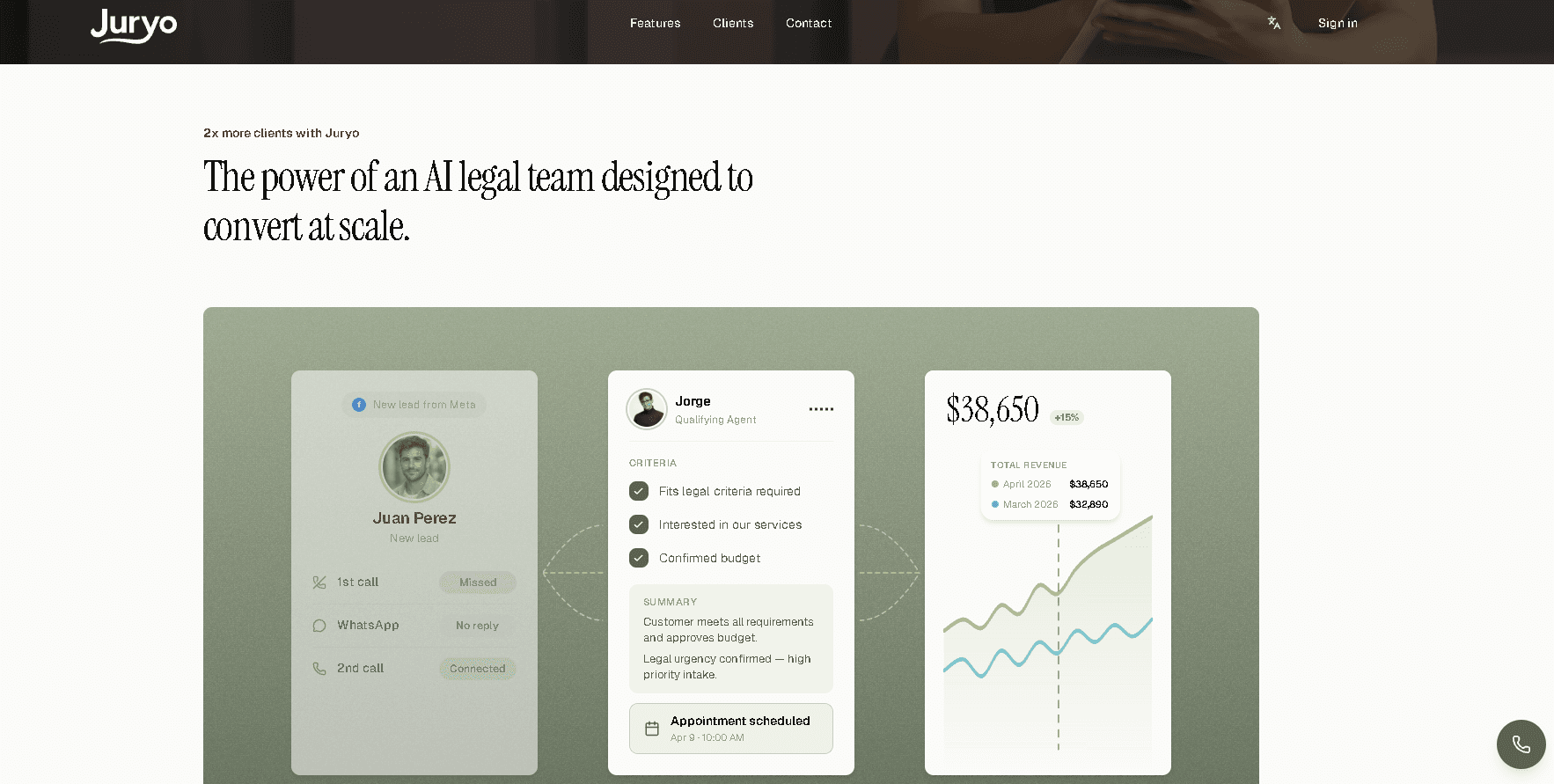
When a prospective client reaches out late at night or over the weekend, the exact same agent answers, maintains conversation history across channels, and conducts a complete screening dialogue. There’s no handoff between separate tools, no translation layer delay, and no second vendor contract to reconcile.
Consumer practices in personal injury, immigration, family law, criminal defense, and employment law require specific intake logic. Jorge asks targeted screening questions reflecting actual legal criteria, such as jurisdiction limits, injury types, incident dates, and existing legal representation.
This is the specialized structure that separates Jorge from generic call-center scripts, operating as an AI legal assistant that gathers actionable case details and books qualified consultations directly onto your calendar.
Proof: Firms Already Using Legal AI for Intake
Seeing how this technology performs across actual practices gives you the clearest picture of what to expect in the field.
Who is Using It
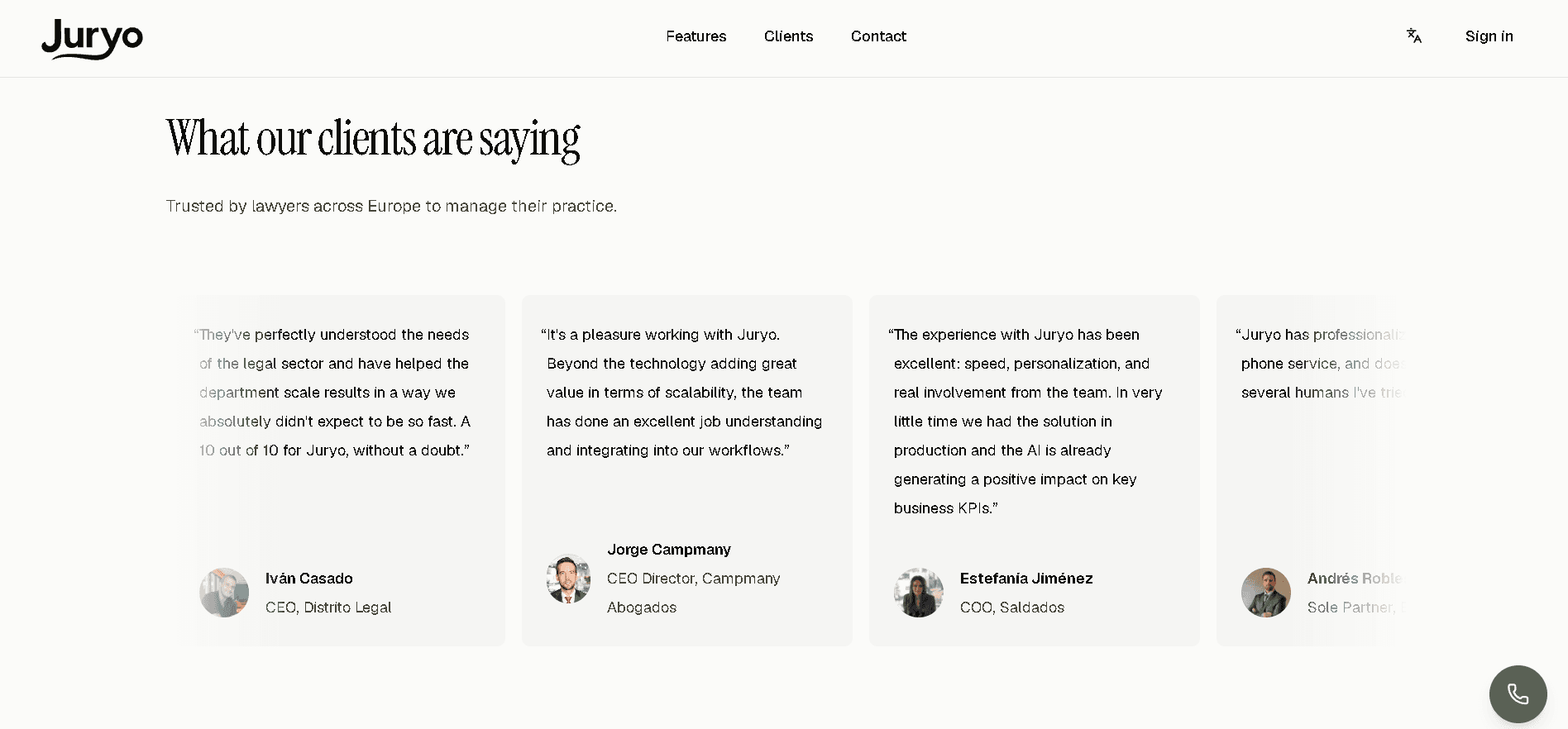
Jorge is already running front-door operations for high-volume consumer practices every single day. In fact, established law firms including Legalitas, Sello Legal, Indemnizame, and DVuelta rely on Jorge to manage their incoming pipeline.
These teams handle heavy inquiry volumes, providing real-world proof that specialized legal AI software handles operational stress without breaking.
The Results, Verbatim

Replacing delayed callbacks with instant qualification changes the financial math of a practice.
Across live deployments, Jorge consistently delivers:
- ~50% lift in lead conversion
- 2.1x more signed matters
- 85% client response rate
Juryo Pricing
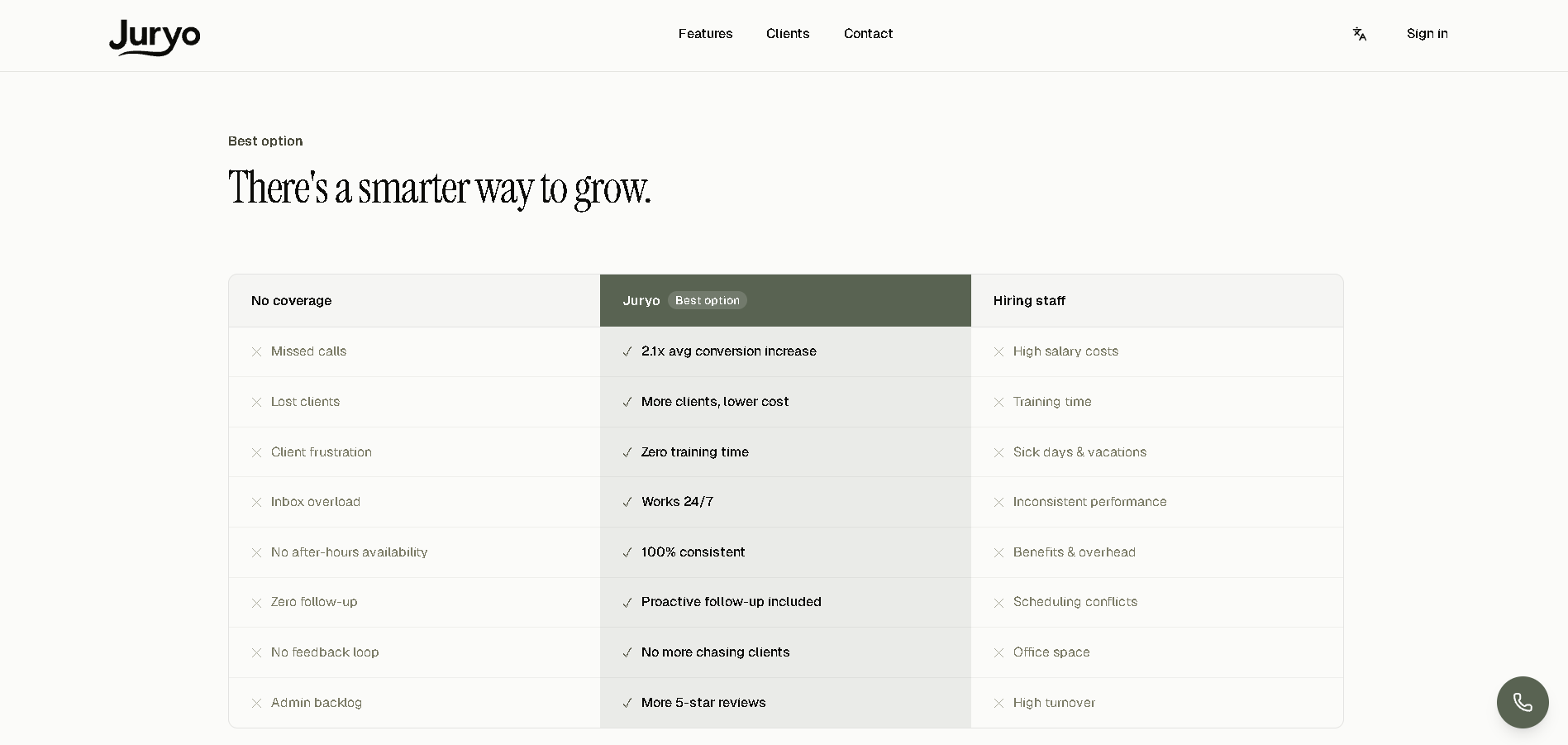
When deciding whether to invest in legal AI software, the focus should be on tangible outcomes rather than rigid subscription tiers.
Juryo structures pricing around your practice's specific call and message volume upon request.
Instead of charging for user seat licenses or counting call minutes, the pricing model aligns directly with concrete results like higher response rates and additional signed matters. Also, custom scoping ensures your software investment directly mirrors the revenue returns generated at your front desk.
Ready to see how automated intake transforms your conversion rates? You can book a demo to get a tailored breakdown for your practice.
How to Start: A Short Sequence
Testing new legal AI tools in a small practice requires a focused approach. For those figuring out how to automate law firm intake, following a simple five-step implementation plan helps firm owners adopt software smoothly without disrupting daily operations.
Step 1: Target the Workflow Losing Actual Money
Pick the single operational step where your practice currently leaks revenue. So instead of choosing a process because it sounds technologically advanced, focus on the exact spot where prospective clients fall through the cracks. For most consumer law practices, that leak sits right at the front desk where missed calls go straight to voicemail.
Step 2: Document your Implicit Screening Rules
Write down the specific criteria a staff member applies from memory during intake. Put every qualifying question, jurisdictional boundary, and disqualifier on paper before setting up any system. Giving your software explicit guidelines prevents bad screening decisions once automated tools take over incoming inquiries.
Step 3: Run One Tool on One Workflow for a Full Month
Implement a single application on your chosen workflow and leave it alone for thirty days. Running one tool in isolation gives your team time to gather clean operational data without complicating your software stack. Avoid adding a second platform until you evaluate the performance of the first setup.
Step 4: Measure Business Outcomes Instead of Activity
Track signed matters and client response rates rather than counting administrative minutes saved. Time saved is a secondary efficiency metric, but signed retainers determine your actual financial return on investment. Examining revenue impact gives you a clear answer on how to use AI in a law firm profitably.
Step 5: Establish the Escalation Path Before Going Live
Define exact protocols for handling edge cases, complex inquiries, or distressed callers upfront. Staff members should know precisely when and how an automated interaction transitions to a human team member. Setting up reliable handoffs before launching protects your prospective clients and keeps your practice fully compliant from day one.
FAQ
What is legal AI?
Legal AI refers to specialized software applications that automate administrative operations, analyze case data, and manage client communications for law practices. It operates across five functional categories ranging from legal research to client intake.
How do law firms use AI in 2026?
Law firms use AI in 2026 to automate client intake, summarize case law, draft baseline contracts, reconstruct billable hours, and organize internal workflows. Consumer law practices achieve the fastest financial return by deploying AI at the front desk to qualify incoming leads and book consultations 24/7.
What is the best legal AI for a small law firm?
The best legal AI for small firms is client intake software that answers, screens, and schedules prospective leads around the clock. Because small consumer practices lose the most revenue from missed phone calls, automating front-desk capture delivers a far higher return than back-office research software.
Is legal AI safe for law firms to use?
Yes, legal AI is safe for law firms when software vendors host data on secure servers and never use confidential client records to train public machine learning models. Law practices retain full ethical responsibility for supervising automated tools and verifying every output.
Can AI replace a paralegal or a receptionist?
AI can’t replace a paralegal or receptionist, but an AI receptionist for law firms automates repetitive administrative tasks like taking messages after hours and logging contact details. Automating routine front-desk coverage frees human staff to focus on high-touch client support, complex file prep, and strategic legal tasks.
What are examples of legal AI agents?
Legal AI examples include dedicated intake agents like Juryo's Jorge, which handles 24/7 phone calls and WhatsApp chats. Other examples include case research assistants like Harvey, contract review tools like Spellbook, and AI legal assistant tools built into practice platforms like Clio.
Does legal AI work in languages other than English?
Yes, specialized legal AI platforms process multiple languages natively. Juryo's Jorge conducts full qualifying conversations in both English and Spanish across phone and WhatsApp without relying on third-party translation tools.
What should a law firm never use AI for?
A law firm should never use AI for case-merit decisions, providing legal advice, making conflict-of-interest rulings, or filing court documents without human review. High-stakes evaluations, caller crisis situations, and citation verification must remain strictly in licensed attorney hands.
How much does Juryo cost?
Juryo pricing is tailored on request based on your practice's specific call and message volume. Instead of paying for seat licenses, your investment aligns directly with outcomes like higher response rates and signed retainers. You can book a demo to receive a customized quote for your practice.
Final Verdict
Finding the right legal AI software comes down to solving the right operational problem first.
The five technology categories address completely different friction points across your practice, but client-facing intake delivers the fastest financial payback for a small consumer firm. Fixing how leads enter your practice actively changes how many retained clients walk through your door, making front-door automation your smartest investment.
Your immediate first step is auditing your current call volume, identifying where missed leads drop off, and replacing manual callbacks with instant 24/7 qualification. Deploying Jorge, Juryo's AI intake agent, protects your incoming pipeline across both phone calls and WhatsApp text channels.
Established consumer practices such as Legalitas, Sello Legal, Indemnizame, and DVuelta already run Jorge at scale to secure incoming cases before competitors even respond.
And field results from these live deployments confirm the commercial impact of automated intake: a ~50% lift in lead conversion, 2.1x more signed matters, and an 85% client response rate.
Needless to say, putting an intelligent agent at your front desk secures warm leads while your team focuses on high-value legal work.