Legal AI Consultant: How Law Firms Roll Out AI in 90 Days
November 23, 2026 · 17 min read

A legal AI consultant helps a law firm decide where AI fits into its work and how to put it into practice. Most UK firms that hire one get a review, a roadmap and a set of recommendations, but the firm is still left to put those recommendations into action. That's where many AI projects stall.
Imagine you're the practice manager at a personal injury firm. Two consultancies have offered several weeks of paid discovery before anything goes live. Meanwhile, calls after 5pm still go unanswered, and fee earners still spend their afternoons chasing payslips and signed client care letters. A consultant's report doesn't fix either problem.
This guide gives you a practical 90-day plan for rolling out AI in your firm. You'll learn how to identify the first problem to tackle, choose the right AI agent, get it live by week four, measure the results in month two and decide what to automate next.
Key Takeaways
- Start with one problem that's costing your firm enquiries or taking up staff time.
- Audit your client journey before choosing which AI agent to introduce.
- Get your first agent live by week four, then measure its performance against your baseline figures.
- Review conversations, identify problems and adjust the agent's rules in month two.
- Introduce another agent in month three once the first is working well.
The 90 Day AI Rollout Plan at a Glance
You don't need to automate everything at once. Start with one task that's taking up your team's time or causing you to lose new clients. Get an AI agent working on it, check the results and then decide what to tackle next.
Here's what the first 90 days could look like:
| Phase | What happens | Who owns it | What done looks like |
|---|---|---|---|
| Weeks 1 to 2: Audit your firm and pick the first agent | Review how your firm handles new enquiries and client requests. Find where work gets delayed or falls through, then choose one task for AI to handle. Set the rules the agent must follow. | Managing partner or COLP (Compliance Officer for Legal Practice), with the practice manager | One task selected, the agent's responsibilities and rules agreed, and baseline performance figures recorded. |
| Weeks 2 to 4: Go live | Choose which channels and tasks the agent will handle. Set it up to follow your firm's rules, work with your existing systems and pass issues it can't handle to the right person. Test it before launch. | Practice manager, with the provider | The agent is handling real enquiries or client requests, records reach the firm's systems, and staff know when they'll need to step in. |
| Month 2: Measure what changed | Compare the agent's performance with your baseline figures. Review conversations, find problems and adjust its rules where needed. | Practice manager, reporting to the partners | A clear picture of what's improved, what still needs work and which changes to make. |
| Month 3: Add the next agent | Look at other parts of the client journey where work gets delayed or takes up staff time. Choose the next task and introduce another agent if needed. | Managing partner or COLP | A second task automated, with a plan for what to tackle next. |
Below, we'll cover each stage in more detail, from auditing your processes and choosing an agent to setting it up, measuring results and expanding to other agents.
If you'd rather have someone handle the setup and guide you through the process, Juryo can help.
Juryo looks at how your firm works, helps you decide where AI fits and configures the agents around your requirements. You can have your first agent up and running in under two weeks. Book a demo.
Legal Technology Consultant vs. an AI Partner Paid on Results
A legal technology consultant advises firms on which AI tools to buy and how to implement them in your law firm. They typically charge by the hour or project, regardless of the results.
That doesn't make them the wrong choice. If your firm is replacing its case management system, for example, a legal technology consultant can help you assess your options and manage the change. The important questions are how they're paid and what your firm has in place when the engagement ends.
Meanwhile, an AI partner paid on results takes a more hands-on role. Rather than recommending tools, they handle the setup, with pricing based on agreed success measures. These might include calls answered, leads qualified or clients signed, depending on what the firm defines as success.
Here's how the two approaches compare.
| Question | Typical legal AI consultant | Juryo (AI partner paid on results) |
|---|---|---|
| How it’s paid | By the hour or project, regardless of results | Based on successful conversion |
| What the firm gets | A review, roadmap and recommendations | AI agents handling client enquiries |
| Who configures the AI tools | Usually the firm or its chosen vendor | Juryo configures the agents around the firm's criteria, tone and rules |
| Integration | Recommends an approach, and the firm handles the implementation | Handles setup and integration with the firm's existing tools |
| Time to go live | After discovery and procurement, the firm selects a vendor and moves on to implementation | Under two weeks |
| After the AI tools are live | The engagement ends | Juryo continues working with the firm and refining its agents |
A consultant is paid whether or not anything changes. Juryo's pricing is based on successful conversion, so Juryo wins when the firm wins.
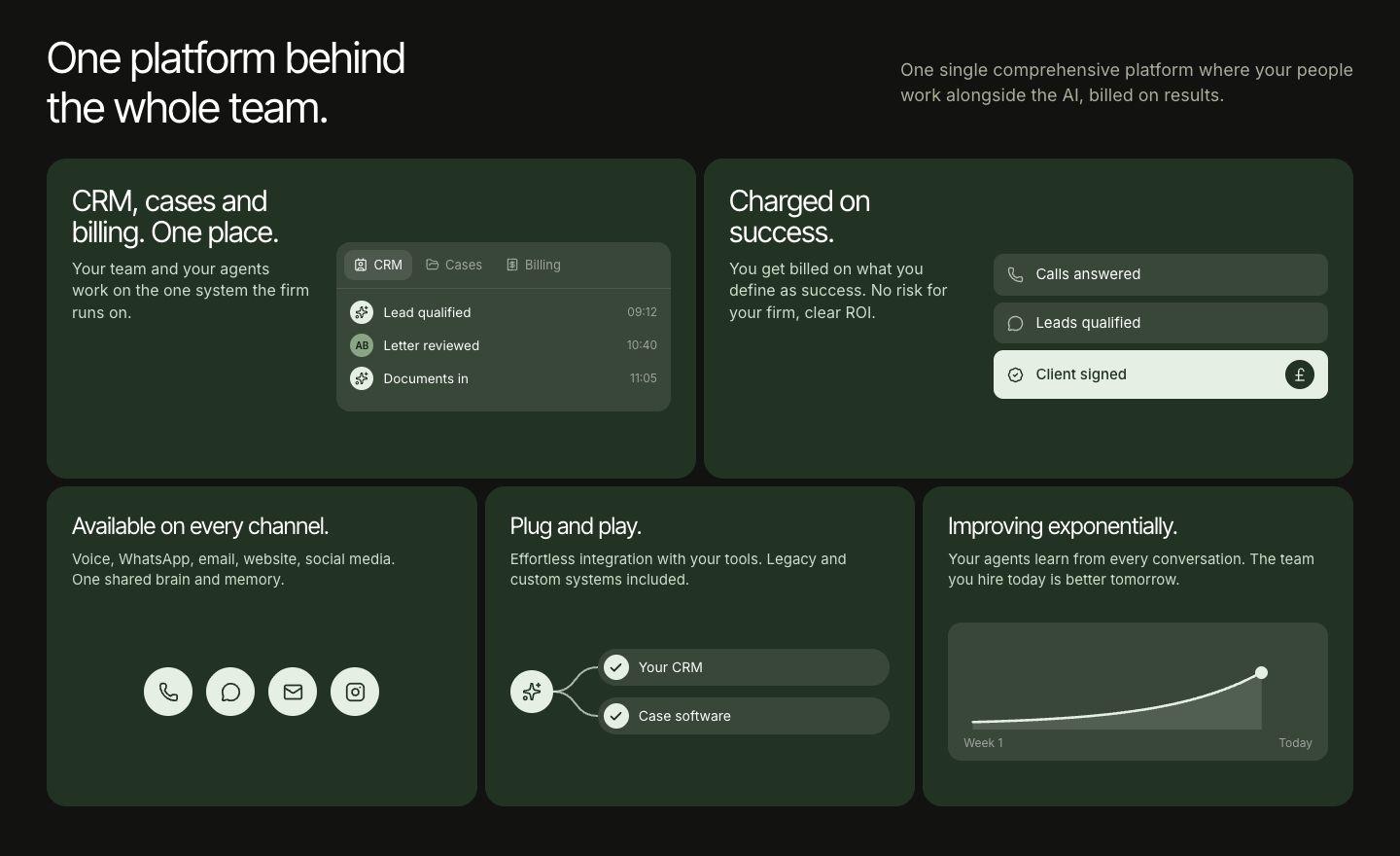
Juryo bills on what the firm defines as success, such as calls answered, leads qualified or clients signed.
AI Adoption in Law Firms: Where to Start
Start with tasks that slow down client intake or cause the firm to lose enquiries. These are easier to automate because they follow defined steps and have measurable results.
Good starting points include answering enquiries, qualifying prospective clients, booking consultations, sending engagement letters and collecting client documents. You can track response times, consultation bookings and how quickly clients complete their paperwork.
Firms are free to use AI, provided they meet SRA standards. The firm remains responsible for its work, including anything produced with AI. Research, drafting and legal advice stay with your solicitors.
So, how do you get started? Here's a practical, three-month plan for implementing AI in your firm.
Weeks 1 to 2: Audit Your Firm and Pick the First Agent
Before choosing an AI tool, the Law Society recommends defining what you want it to do and how you'll measure success. The SRA also advises checking what your existing software can already do before buying anything new.
So, spend the first two weeks tracing how enquiries move through your firm, from first contact to signed client. Look for where enquiries go unanswered, follow-ups get missed, consultations fail to convert or files sit waiting for documents. These gaps will help you decide which agent to introduce first.
What to audit
Start by speaking to the people who handle enquiries, book consultations and onboard clients. Ask them where work gets delayed, which tasks they repeat and what information they regularly have to chase.
Then review your existing systems and record these figures to establish a baseline for month two:
- Enquiry channels: How many enquiries arrive through phone, website forms, WhatsApp, email and social media?
- Out-of-hours enquiries: How many arrive in the evenings, at weekends and on bank holidays?
- First response time: How long does it take the firm to respond to a new enquiry?
- Missed follow-ups: How many prospective clients never receive a second call or message?
- Conversion rate: What percentage of consultations result in signed clients?
- Document collection: How many days pass between a client signing and submitting all the required documents?
- Status calls: How many calls do fee earners receive each week from clients asking for case updates?
Then name the owner. The SRA expects, as a minimum, the COLP to be responsible for regulatory compliance when new technology is introduced, so put the COLP’s name on the plan from day one.
Pick the first agent
The problems uncovered in your audit will help you choose which agent to start with.
Four of Juryo's AI agents cover different stages of the client journey: George (qualification), James (sales), Jessica (onboarding) and Julia (customer support).
| What the audit shows | Start with | What changes |
|---|---|---|
| Missed or slow first contact, enquiries that go quiet | George, qualification | Every lead is contacted as they arrive, qualified against the firm's criteria and booked into the calendar. |
| Consultations that don’t turn into signed clients | James, sales | The firm's pitch is presented, objections are handled and engagement letters are sent for signing. |
| Clients taking too long to submit documents | Jessica, onboarding | Requests documents and follows up on outstanding ones until the client’s file is complete. |
| Fee earners spending time answering status calls | Julia, customer support | Handles routine client questions, with urgent matters escalated to the right staff member. |
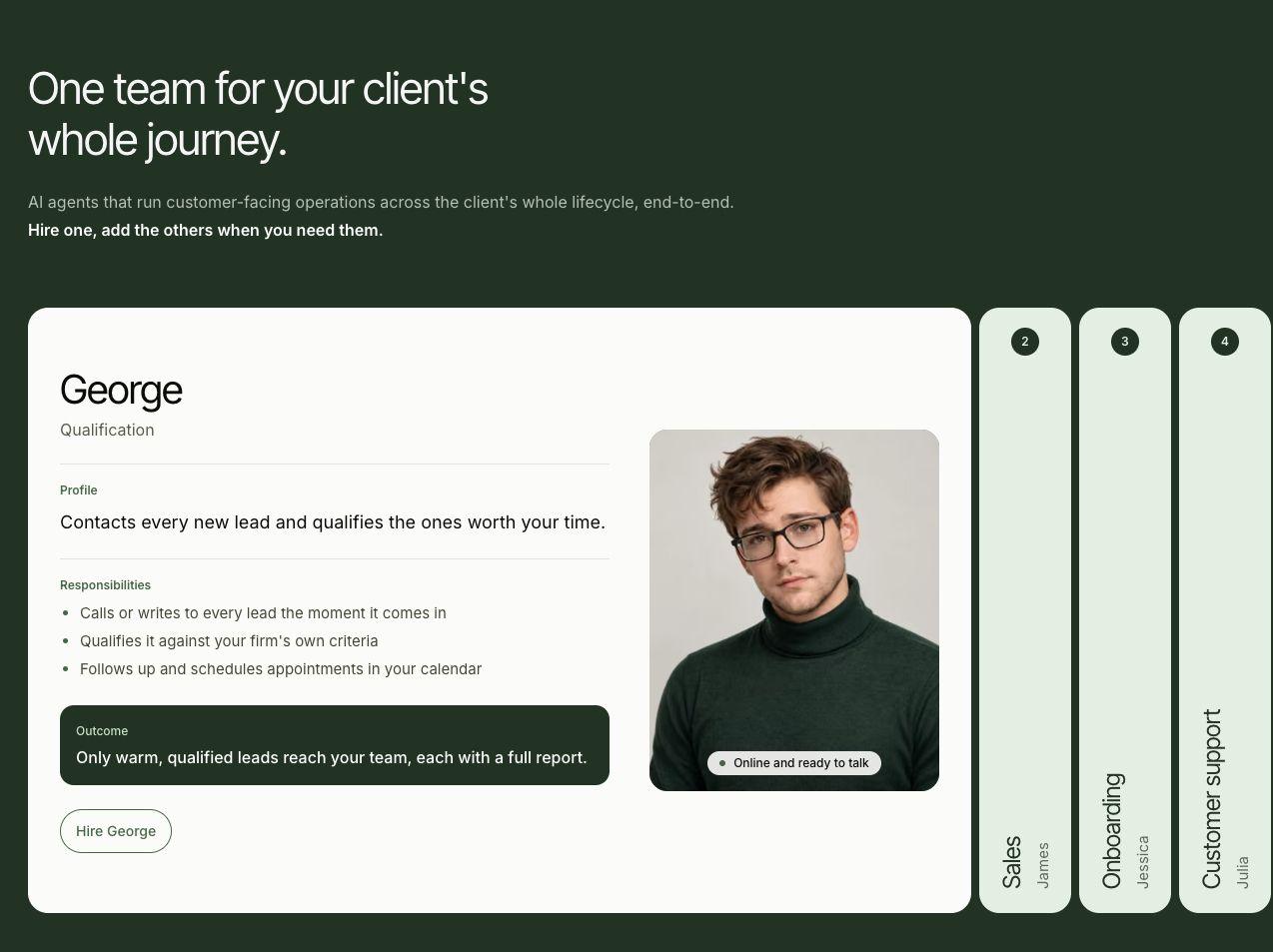
George handles qualification, with James, Jessica and Julia covering sales, onboarding and customer support.
Write down the rules
An agent can only follow instructions the firm has defined. Before going live, document:
- The tone the agent should use for each practice area.
- What counts as urgent.
- Who on your team receives each type of escalation.
- Which matters must always go to a solicitor.
Weeks 2 to 4: Go Live
Pick one agent and start with the channel where your firm misses the most enquiries, whether that's phone, WhatsApp, email, your website or social media.
Then connect the agent to your existing tools. Juryo integrates with Clio Manage and works alongside your case management system or a spreadsheet, so staff don't have to search through separate inboxes for client information.
Once everything is connected, test how the agent handles different scenarios:
- Can the agent handle an enquiry when the prospective client doesn't know which practice area they need?
- What happens when someone provides incomplete information?
- Can it recognise urgent enquiries and alert the right person?
- Does it refer requests for legal advice to a solicitor?
- Are conversations recorded correctly in your firm's connected systems?
- Can the agent flag a failed handover and alert another team member?
Also, make sure clients know when they're speaking to AI. The SRA's guidance expects firms to be transparent about AI use. Juryo's agents identify themselves as AI in every conversation.
Month 2: Measure What Changed
Compare the agent's results with your week-one baseline every week.
The metrics show whether performance is improving, while conversation transcripts help you understand what's going wrong.
| Metric | What it tells you | Which agent it tests |
|---|---|---|
| First response time | How quickly new enquiries receive a response | George |
| Enquiry response rate | How many enquiries receive a response, including out of hours | George |
| Enquiry-to-client conversion rate | How many prospective clients become paying clients | James |
| Time to complete client file | How quickly clients submit all required documents | Jessica |
| Client status calls to fee earners | How many routine client queries still reach fee earners | Julia |
Don't rely on the numbers alone. Read conversation transcripts to spot problems and understand why they happen.
For instance, if the agent repeatedly asks for information a prospective client has already provided, review how it handles conversation history. If it escalates routine questions too often, adjust its rules. If it misses urgent matters, revise its urgency criteria.
Make one change at a time where possible, then compare the following week's results to see whether it helped.
Month 3: Add the Next Agent
Once the first agent is meeting its targets, introduce another one to handle a different part of the client journey.
A firm might add George first to handle new enquiries, followed by James to convert consultations into signed clients, Jessica to collect documents and Julia to answer client questions. But you don't have to follow this order. If your biggest problem is chasing documents, you can start with Jessica.
Juryo's agents share client history, so clients don't have to repeat information when they move from interacting with one agent to another. For example, someone who gave George their details won't have to provide them again when James takes over.
Digital Transformation for a Law Firm: What Changes After 90 Days
For a B2C firm, digital transformation means the client journey runs from first call to complete file without gaps, while solicitors keep the legal work.
By day 90, the 7pm call is answered and the enquiry qualified. The Sunday WhatsApp message is booked into Monday's calendar. The engagement letter is signed without anyone chasing it, and the file is complete before the solicitor opens it.
That is digital transformation for a law firm in practical terms: the work between people stops leaking, and the legal work stays with the people qualified to do it.
Answering Service vs Full Intake: Where an AI Rollout Starts
An answering service takes a message and hands the work back. A rollout that changes outcomes starts with agents that carry the client forward.
What a traditional answering service does
- A legal answering service takes a name, a number and a line about the matter, and sends it to the firm. The follow-up is still the firm’s job.
- It does not qualify against the firm’s criteria, book the consultation or send the engagement letter.
- It leaves the history in an inbox, outside the firm’s CRM.
What Juryo’s agents do instead
- George qualifies new enquiries and books consultations, while James handles the firm's pitch, objections and engagement letters. Jessica then collects the documents needed for the case.
- Every conversation becomes a structured record in the firm's systems, with client history shared across all of Juryo's agents.
How Juryo Rolls Out AI in a Law Firm
Juryo handles the analysis, setup, integration and launch, getting your first agent live in under two weeks.
Here’s how:
- Juryo analyses your processes. Its team reviews how your firm handles enquiries and clients, identifies where AI agents can help and recommends where to start.
- Choose your starting agent. Start with the agent that addresses your firm's biggest needs. Add the others as your requirements change.
- Connect your existing tools. Juryo integrates its agents with the software your firm already uses, including legacy and custom systems.
- Go live in under two weeks. Your first agent starts handling client conversations, and Juryo stays alongside your firm to monitor and refine its performance.
- Expand your team. Add more agents as your firm grows and you identify other tasks to automate.
Your staff remain in control. Juryo’s agents escalate matters outside their scope to your team for their judgment.
They handle enquiries 24/7 in English and Spanish across phone, WhatsApp, email, website and social media.
As for data protection, client data is stored in the EU. Juryo provides a Data Processing Agreement, and conversations aren't used to train AI models.
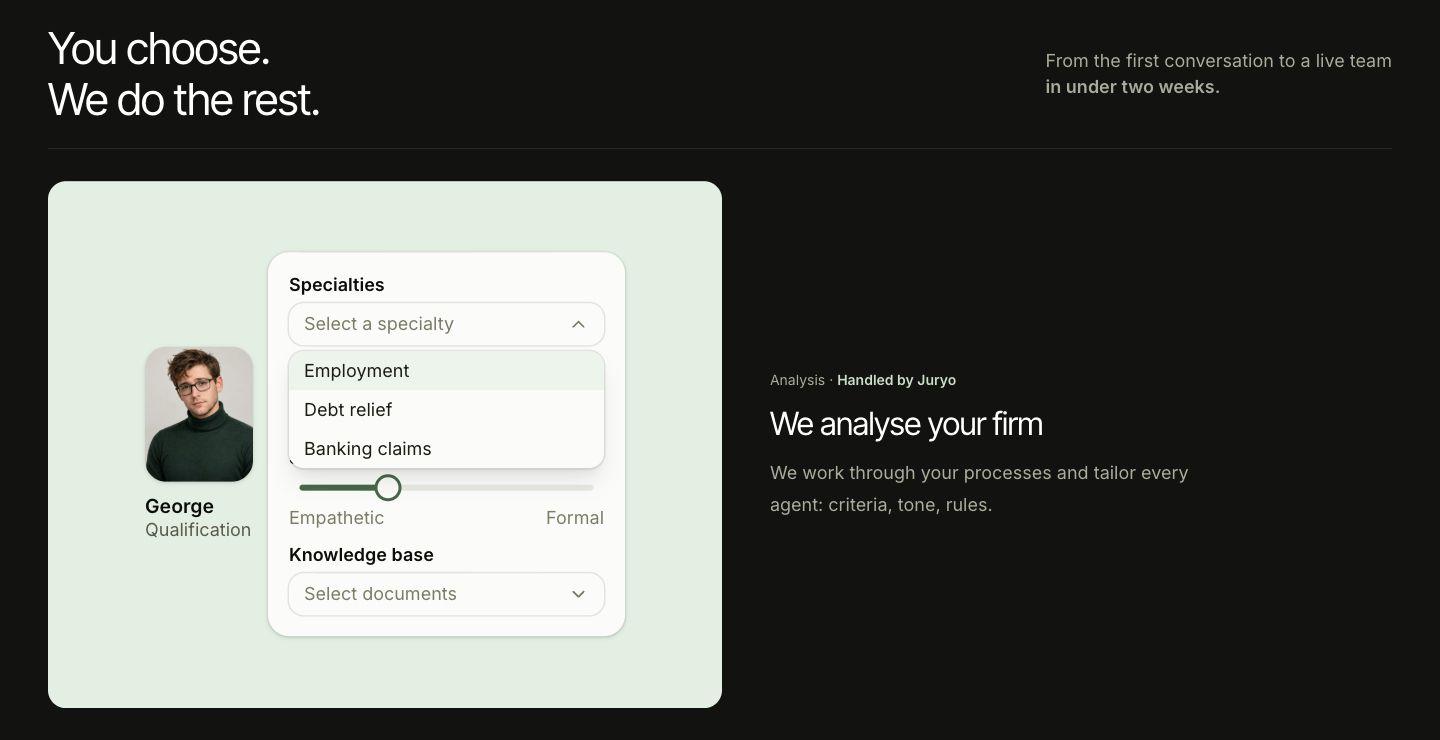
During analysis, Juryo sets each agent's criteria, tone and rules for your firm.
Proof: What Juryo Reports Across Its Clients
Juryo reports +71% conversion from lead to signed contract across its clients.
It also reports an average time to first contact of under 35 seconds and a 53% lower cost than running the same work in-house.
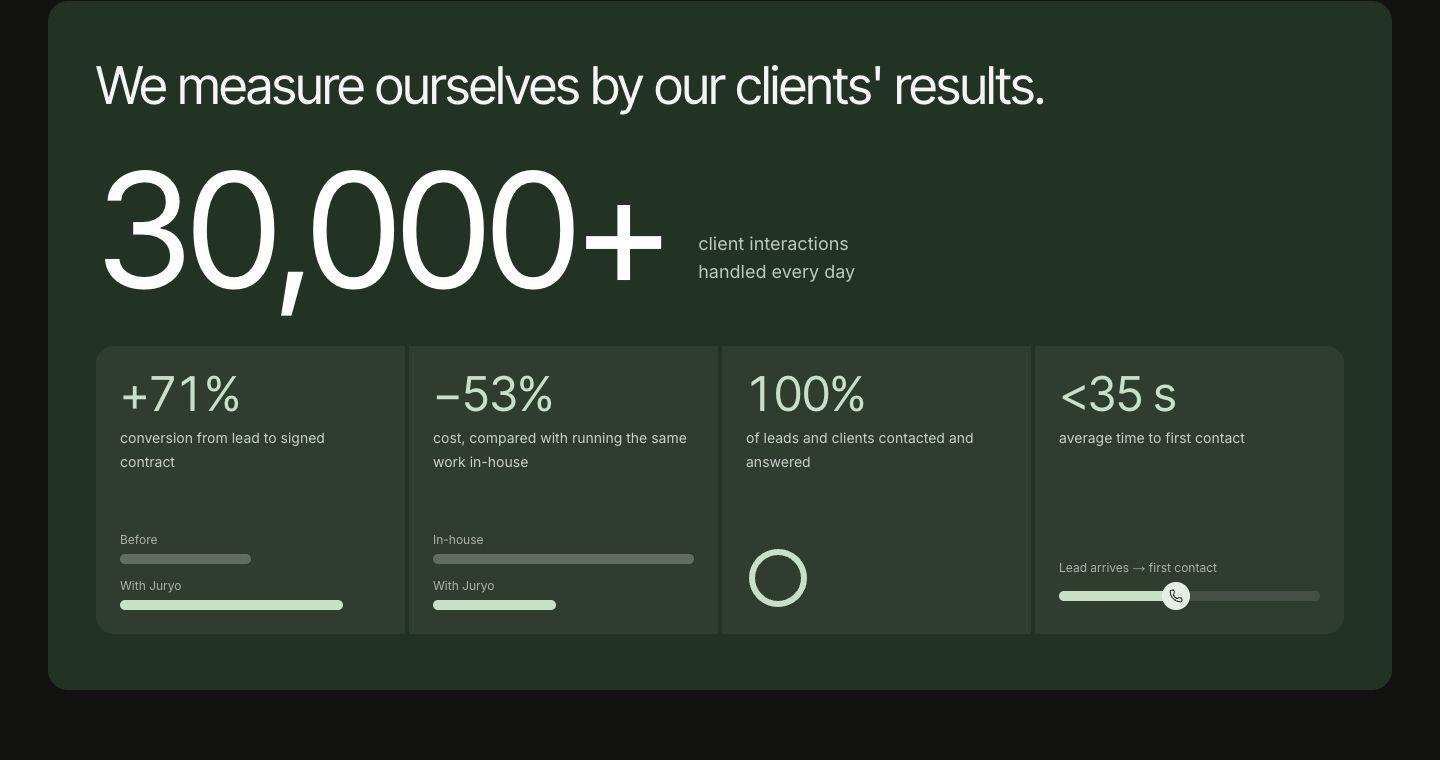
Results Juryo reports across its clients, as shown on juryo.ai.
Firms working with Juryo include Legálitas, Sello Legal Abogados, indemniza.me, Saldados and Campmany.
Here’s how Saldados' COO described their implementation experience with Juryo: "In very little time we had the solution in production".
FAQs
What does a legal AI consultant do?
A legal AI consultant reviews a law firm's processes, recommends suitable AI tools and may help with implementation and staff training. They're usually paid by the hour or for the project, regardless of the outcome.
Do I need an AI consultant for law firms, or can we do it ourselves?
You can follow the 90-day plan yourself or work with a provider that handles setup. The difference is what you're paying for: a consultant provides advice, while a provider like Juryo handles implementation and is paid based on successful conversion.
How long does it take to roll out AI in a law firm?
Juryo can get your first client-facing agent live in under two weeks. The rest of the 90 days involves measuring results, adjusting the agent's rules and introducing additional agents.
What should a law firm automate first?
Start with the stage where your firm misses the most enquiries or spends the most time on repetitive tasks. For many B2C firms, that's first contact and qualification. George, Juryo's qualification agent, contacts new leads, qualifies them against your criteria and books consultations.
Does the SRA allow law firms to use AI?
Yes. Law firms can use AI, but existing SRA requirements still apply. Solicitors remain responsible for their work, including anything produced with AI.
Does Juryo replace my staff?
No. Juryo's agents handle tasks such as answering enquiries, booking consultations, collecting documents and responding to status questions. They pass conversations requiring human attention to your team, while solicitors retain responsibility for legal work.
How much does Juryo cost?
Juryo's pricing is based on successful conversion. Juryo wins when the firm wins. To see how George would handle your enquiries, book a demo.
Final Verdict
A traditional legal technology consultant helps you decide which tools to use and how to implement them. Juryo goes a step further by handling the implementation, configuring AI agents around your firm's processes and connecting them to your existing tools.
This makes Juryo a good fit for B2C firms looking to improve client intake, consultation bookings and onboarding without taking on the technical work themselves. Your first agent goes live in under two weeks, and pricing is based on successful client conversions.
A firm replacing its core systems, such as its case management software, may still need a traditional consultant. But for a B2C firm losing enquiries, one problem fixed, live and measured is worth more than a strategy document.
Book a demo to see how Juryo's agents could fit into your firm's workflow.
Recommended Reading
5 Best AI Legal Intake Tools for Law Firms (2026)
How to automate law firm intake: a step-by-step guide
The best AI sales representative for law firms (2026)
Lead Follow Up for Legal Intake: How to Re-Engage Enquiries That Go Quiet
Law Firm Collections: How to Recover Overdue Instalments Without Chasing Clients